Nano Banana and GPT Image Without a Node Graph
- guide
- studio
- comparison

ComfyUI's Partner Nodes let you call hosted models such as Nano Banana and GPT Image from inside a ComfyUI graph. You don't need a GPU or a model download, and each run is billed in Comfy credits. If the hosted model is one step in a bigger pipeline (generate with Nano Banana, upscale locally, then animate), that's exactly the right tool.
But a lot of graphs aren't bigger pipelines. They're a few Load Image nodes, a Partner Node and a Save Image node. If that's most of what you do, and especially if what you make is websites and app screens, the graph is overhead. This post shows the same models in Pluck Studio and is clear about what you give up.
The same models, one card
In Pluck Studio every prompt is a card on a board. You pick the model on the card:
| Model | Good at | References | Credits at the default quality |
|---|---|---|---|
| Nano Banana 2 | Fast, good text, strong with references | Up to 14 | 20 |
| Nano Banana Pro | Google's highest quality | Up to 14 | 38 |
| GPT Image 2 | The most accurate UI text | Up to 16 | 38 to 55 by shape (11 to 15 at Medium) |
| Seedream 5 Pro | Detailed, good value | Up to 10 | 18 |
| Seedream 5 Lite | Fast and cheap for exploring | Up to 10 | 9 |
| Ideogram V4 | Typography | Text only | 8 |
| Recraft V4.1 | Clean, design-led output | Text only | 9 |
One credit is about one cent. Higher quality tiers cost more (Nano Banana 2 goes from 15 credits at 0.5K to 40 at 4K), and the card shows the exact cost before you run, including how many runs a prompt will make.
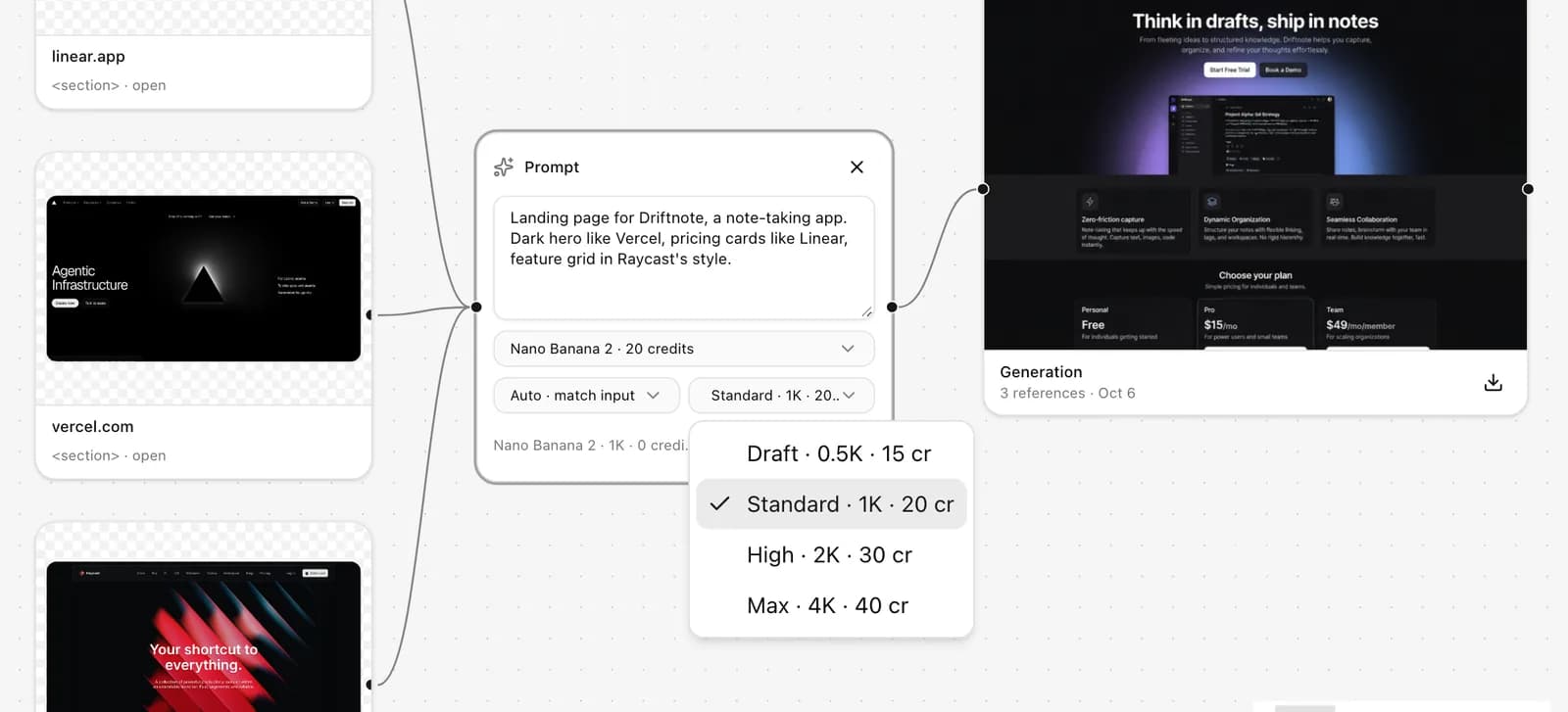 Nano Banana 2 quality tiers and their prices, right on the card.
Or leave the model on Auto. Auto picks a model that accepts all the references you've connected, and prefers models that are good at UI text when your brief mentions things like headlines, buttons, pricing or navigation.
What replaces the graph
Here's the equivalent of a Load Image, Load Image, Nano Banana, Save Image graph in Pluck:
- Add your references to a board. Upload images, or pull in components you've plucked from websites with the Pluck extension. Plucked components carry their source and a description of what they are, which helps the model when your brief says "the navigation from the first reference".
- Add a prompt card and write the brief.
- Drag a connection from each reference into the prompt.
- Pick Nano Banana 2 (or Auto), an aspect ratio and a quality tier.
- Run. The result appears as a generation card next to the prompt.
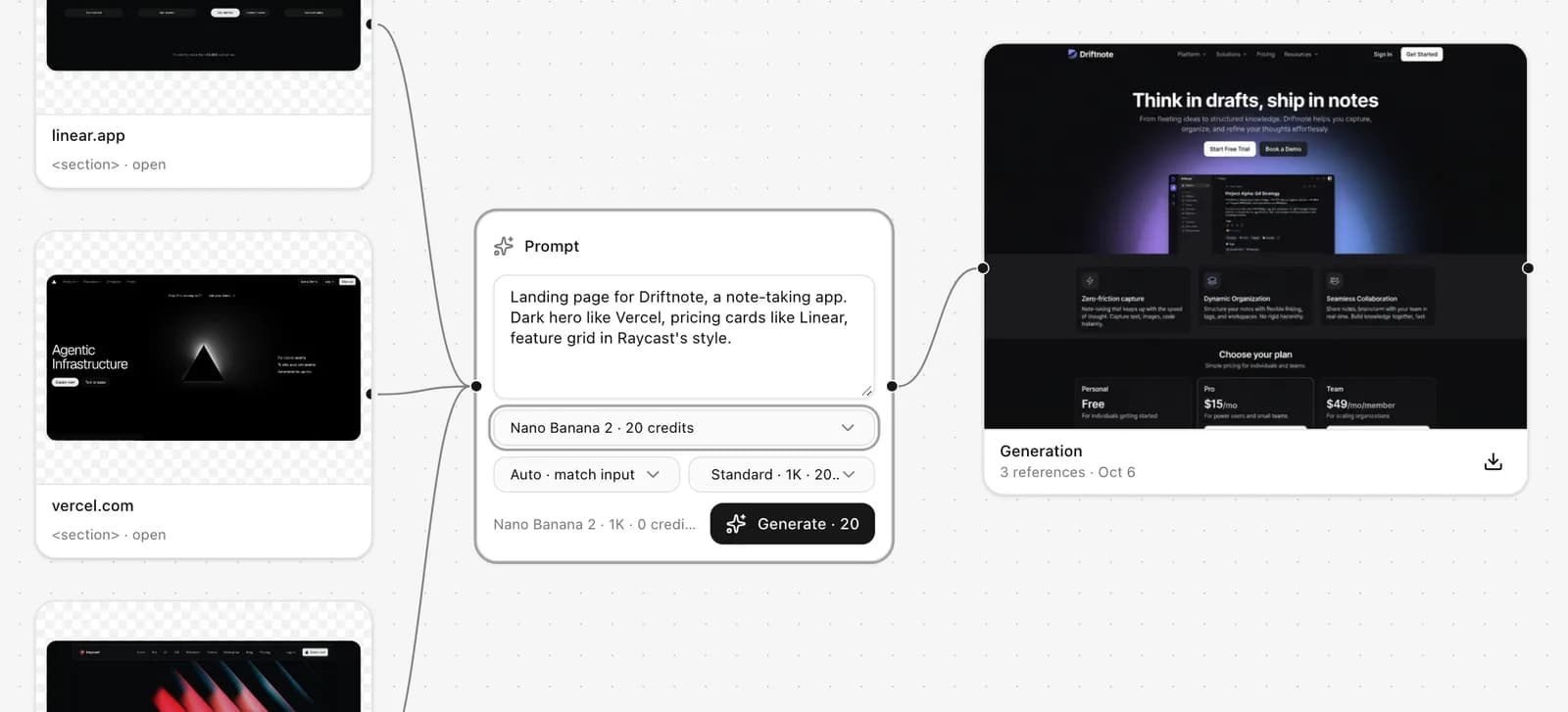 References in, one prompt card, one Generate button: no graph to wire.
To revise, connect the generation into a prompt and describe the change. With several generations connected, choose Each to apply one change to every candidate, or Combine to merge them into one. You can also ask the board chat to do it: "connect the last two generations into a new prompt, combine them, and run on GPT Image 2 at 16:9".
There's a free path too. Set a prompt to Local in the desktop app and it runs through your own Codex CLI with your OpenAI account. It costs no Pluck credits on any plan, including Free. Here's how to set it up.
What you give up
Being clear about this matters more than the feature list:
- No pipeline after the model. In ComfyUI the Nano Banana output can feed an upscaler, an inpainting pass or a video model in the same graph. In Pluck, a generation can feed another prompt, and that's it. You can download the image and take it into ComfyUI for the rest.
- Fewer settings. You get the brief, aspect ratio, quality tier and a prompt template. There are no seeds or other model parameters to tune.
- A smaller catalogue. ComfyUI's Partner Nodes cover many more providers, including video models. Pluck has the seven image models above, picked for interface design.
- No local GPU. If you also run open-weight models, ComfyUI does both in one place.
Who this is for
Pluck makes sense if you're using hosted models to design websites, apps or dashboards and you'd rather spend your time on the brief than on the graph. If the hosted model is one step in a bigger image or video pipeline, stay in ComfyUI.
The full side-by-side is on Pluck vs ComfyUI.
Try it
Open Pluck Studio, make a board and run a prompt. Hosted models are on every paid plan, starting with Starter at $10 a month for 1,000 credits, which is about 50 standard Nano Banana 2 runs.