Aspect Ratio, Quality and Model: Setting Up a Hosted Generation
- guide
- studio
- pricing

A prompt card in Pluck Studio has three settings that decide how a hosted run comes out and what it costs: the model, the aspect ratio and the quality. The defaults are good, and you can run a whole project without touching them. But each one is a lever, and knowing which one to pull saves credits and rerun time. This post goes through all three, with the settings we use ourselves.
The three settings on a prompt card
Open a board in Pluck Studio, select a prompt card, and you will see:
- Model: Auto, one of the hosted models, or Local.
- Aspect: Auto, or a fixed ratio.
- Quality: Draft, Standard, High or Max.
Below them, Studio shows the credit cost for the run before you press it. That number updates as you change the settings, so you can price a run before spending anything.
Model
Pluck hosts a set of image models, and as of October 2026 the list is Nano Banana 2, Nano Banana Pro, GPT Image 2, Seedream 5 Pro, Seedream 5 Lite, Ideogram V4 and Recraft V4.1. They differ in how well they render legible UI text, how many reference images they accept, and price.
Auto picks for you. It looks at your brief and your references. UI design briefs are text-heavy (navbars, buttons, pricing, labels), so for those Auto prefers models that render text well. It also rules out any model that cannot take the number of references you connected. If you have four plucks connected and a model only accepts two, Auto will not pick it.
Picking a model by hand makes sense when:
- You want to spend less. Ideogram V4, Seedream 5 Lite and Recraft V4.1 cost about 8 to 9 credits at Standard quality, roughly half to a quarter of the others.
- You liked a previous result and want the same model to iterate on it. Switching models between iterations changes more than you asked for.
- You are generating something with little text, such as a hero illustration or a background, where the text-rendering strength does not matter.
Rough Standard-quality prices: about 8 to 9 credits for Ideogram V4, Seedream 5 Lite and Recraft V4.1; about 18 to 20 for Seedream 5 Pro and Nano Banana 2; about 38 for Nano Banana Pro. GPT Image 2 is priced by quality and size: 11 to 15 at Standard (its Medium), 38 to 55 at High, which is its default. One credit is about one cent. The exact number is always on the card.
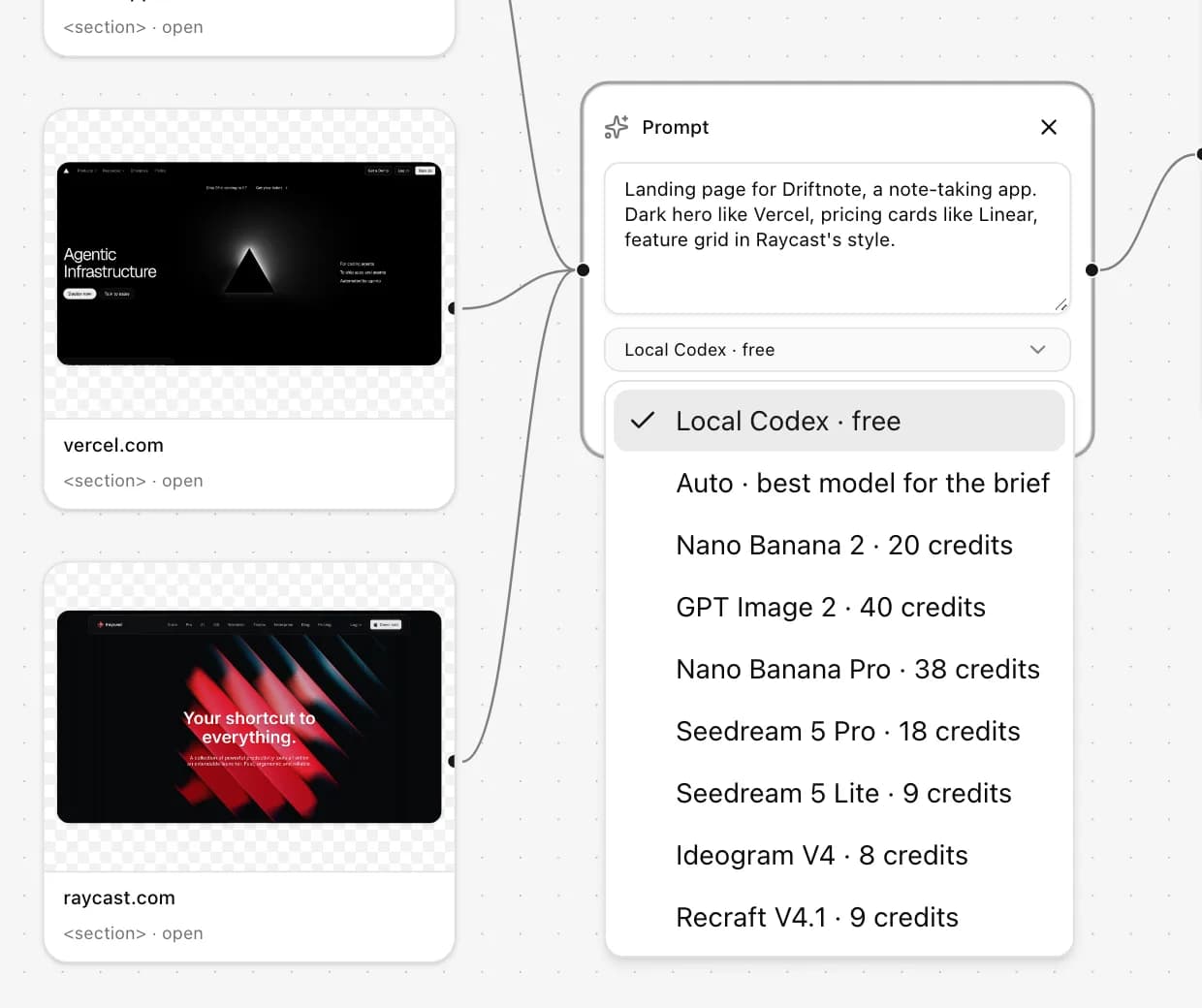 The model menu lists each model with its price at its default quality.
Local is the third option. It runs the prompt through the desktop app and your own Codex CLI, costs nothing, and ignores the quality setting because there is no hosted tier to map it to. The board needs to be open in the desktop app. See Generate Designs for Free with the Pluck Desktop App and Codex.
Aspect ratio
Aspect decides the shape of the output. The options are Auto, 1:1, 16:9, 9:16, 4:3, 3:4, 3:2, 2:3 and 21:9.
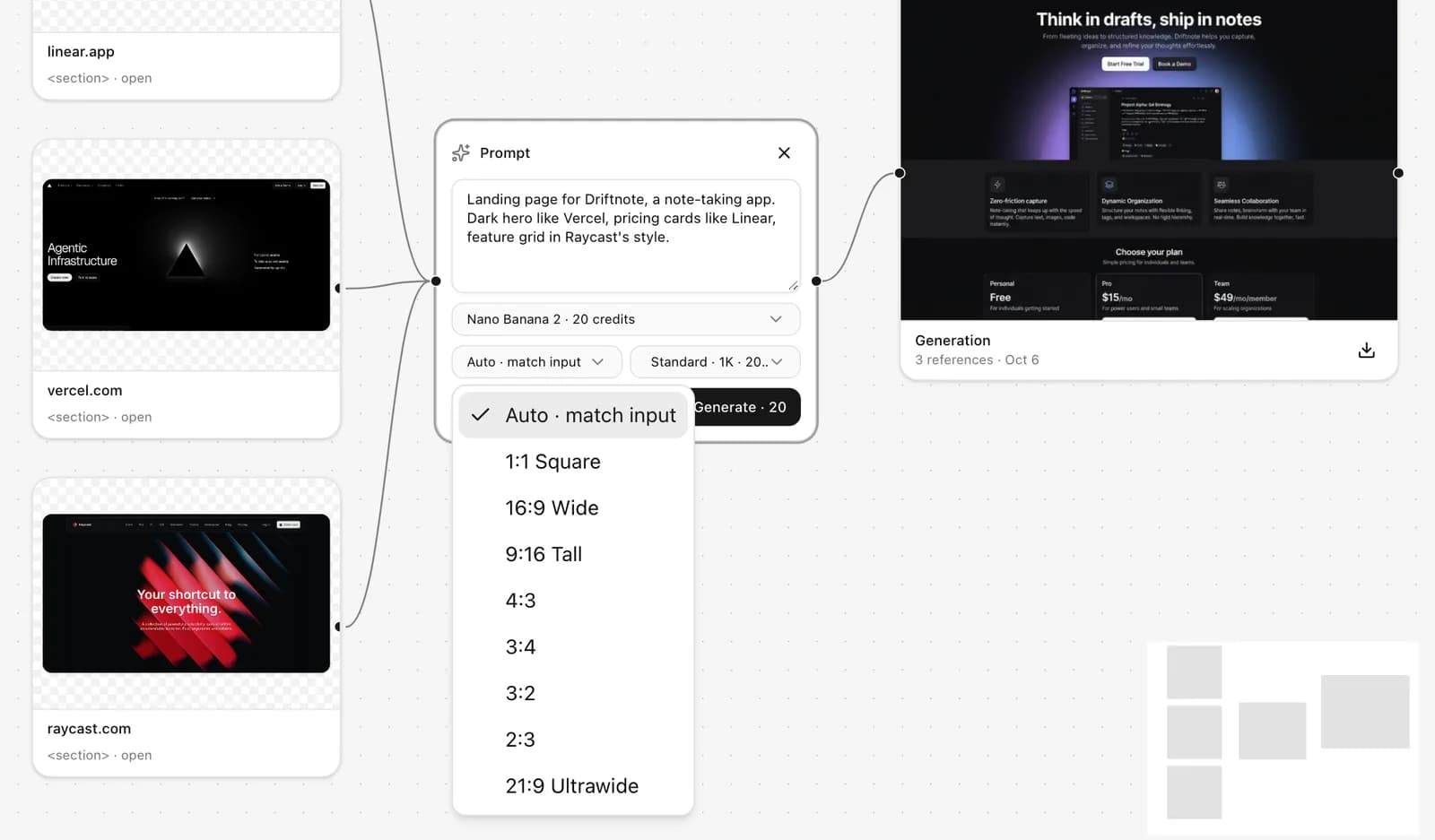 Auto follows the template; pick a fixed ratio when one prompt needs a different shape.
Auto means "use the template's default". The Website template defaults to 16:9, Mobile app to 9:16, and Generic, Graphic design and Custom to following the input: a landscape reference gives a landscape result. Templates are explained in Prompt Templates in Pluck Studio.
Set a fixed ratio when the template default is wrong for one prompt. The common cases:
- A board of web pages where one prompt should produce the mobile version: set that card to 9:16.
- A social card from a product's style: 1:1.
- A wide dashboard or a cinematic hero: 21:9 or 16:9.
- A component on its own, such as a card or a modal, where you do not want it stretched to fill a screen: 4:3 or 3:2 usually fits.
Aspect ratio affects price on some models. GPT Image 2, for example, is priced by output size, so a fixed ratio maps to a size preset and the credit cost follows. Other models charge the same regardless of shape. Again, the card tells you.
Aspect ratio does not resize your references. A 9:16 run with a 16:9 pluck connected means the model is being asked to reinterpret a desktop layout as a tall one. That is often exactly what you want ("make the mobile version of this"), but say so in the prompt rather than leaving the model to guess why the shapes disagree.
Quality
Quality is a model-agnostic ladder: Draft, Standard, High, Max. Each model maps the four tiers to its own options:
- Nano Banana 2: 0.5K, 1K, 2K, 4K.
- GPT Image 2: Low, Medium, High.
- Ideogram V4: Turbo, Balanced, Quality.
When a model lacks a tier, the run falls back to the nearest one it has. GPT Image 2 has no Max, so Max runs as High. Ideogram V4 has three tiers, so Max also runs as Quality. You will not get an error; you will get the closest thing, and the price on the card reflects what will actually run.
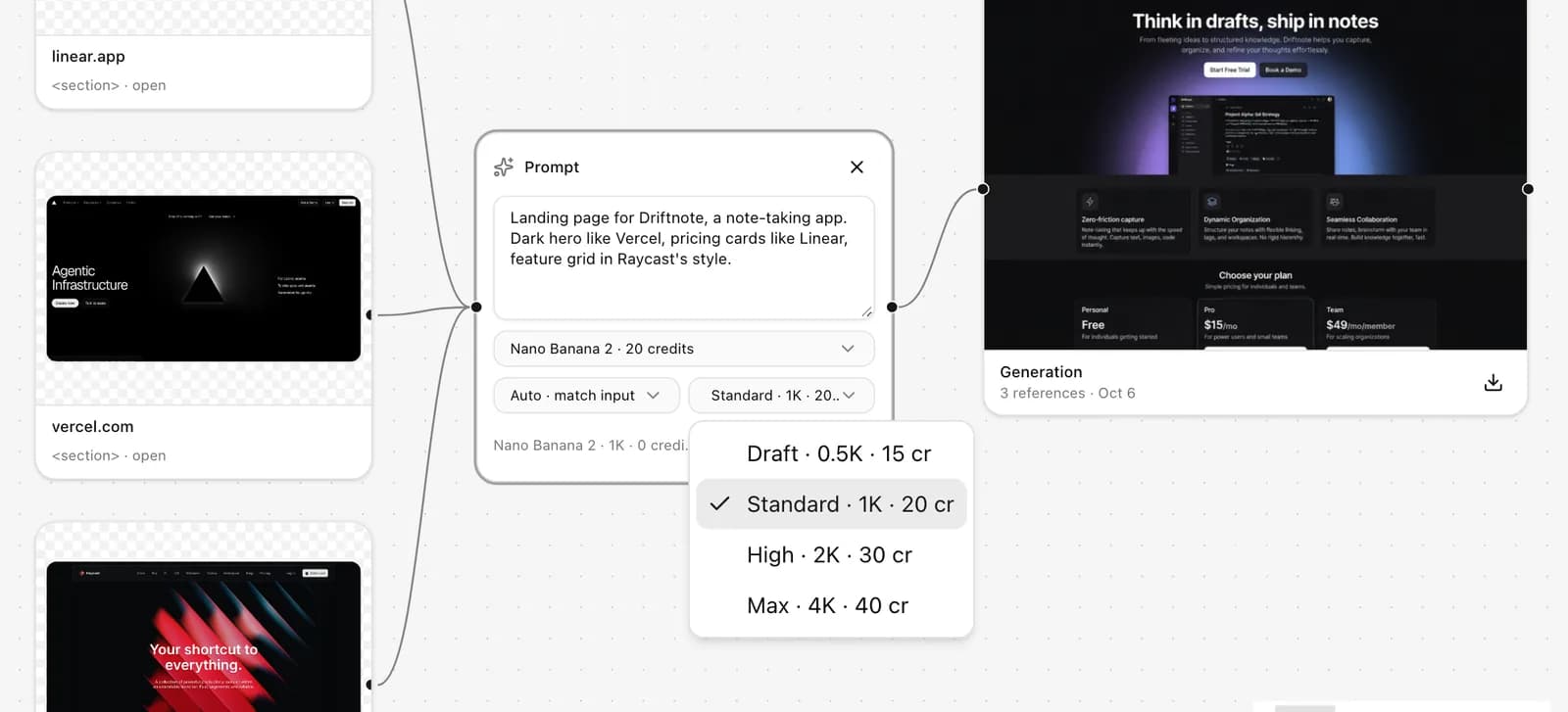 Each tier shows what it maps to on the chosen model and what it costs.
Higher tiers cost more, and on some models considerably more. The question is what you need the image for:
- Draft is for exploring. Running six variations at Draft to find a direction costs less than one run at Max and tells you more.
- Standard is the default and is what most people should leave it on. It is enough to judge a layout, read the text and show someone.
- High is for the result you are going to present or iterate on seriously.
- Max is for the one you will zoom into or print. Most web design work never needs it.
A pattern that works well: explore at Draft with a cheap model, then rerun the winner at High with the model Auto would have chosen. The Each vs Combine post is about exactly that second step.
Settings we use
For a desktop landing page from plucked references: Website template, model Auto, aspect Auto, quality Standard. Rerun the one we like at High.
For an app screen: Mobile app template, model Auto, aspect Auto, quality Standard.
For a mobile version of a page already on the board: same board, new prompt card connected to the desktop generation, aspect 9:16, prompt "the same page as a phone layout, stack the columns, keep the type and colours".
For exploration with a loose brief and no references: Ideogram V4 or Seedream 5 Lite, Draft, five or six runs, then switch to Auto at Standard for the direction that worked.
For anything where the text must be legible on the first try, such as a pricing table or a settings screen: Nano Banana 2 or GPT Image 2, Standard.
What a run costs across plans
Starter comes with 1,000 credits a month, Pro with 3,500 and Studio with 10,000. At Standard quality on a mid-priced model, that is roughly 50, 175 and 500 generations a month; on the cheaper models, two to three times that. Paid plans can top up 1,000 credits for $10 at any time, and top-ups last twelve months. Local generation through the desktop app is free on every plan, including Free. Full details are in Plans and Credits: How Pluck Pricing Works.
Plucking itself never spends credits. Only hosted runs do.
If you have not tried the settings yet, open a board, add a prompt, and watch the cost on the card change as you move between models and tiers. It is the quickest way to build an intuition for what each lever is worth. Open Pluck Studio to start.